
I want to learn systems programming — how the OS works, how the file system works, how memory is managed, what a process is — that deep-level stuff. And to learn systems programming there's no way around C, because most system tools, starting from the Linux kernel itself, are written in C.
But what's the point of just learning C syntax? The real learning happens when you build something. So my plan is this — the commands I use every day on Linux (ls, cat, grep, wc), I'll implement them one by one in C. That way I'll learn C, and I'll also get a hands-on understanding of systems concepts like system calls, file descriptors, and memory allocation.
I'm starting with the simplest command — ls. This post is the first step of that journey.
About the 'ls' Command
ls is shorthand for "list" — in the Unix tradition, commands were kept as short as possible (less typing, faster work). It's one of the most basic Linux commands, and it's incredibly useful. It shows a list of all the files in the current directory — so you can see at a glance what's inside. ls is the very first tool you reach for when navigating and organizing files. And it comes with plenty of options that let you arrange the output exactly the way you want.
How Do We Build It?
Think about it for a second — to replicate ls in a straightforward way, what do we need to do? We need to open a directory, read the things inside it, print them, and then close the directory. Lucky for us, Linux has a few functions that help with exactly this: opendir, readdir, printf, and closedir.
First, let's read the documentation for opendir. Turns out opendir lives in the dirent.h header file, in the standard C library.
man opendir
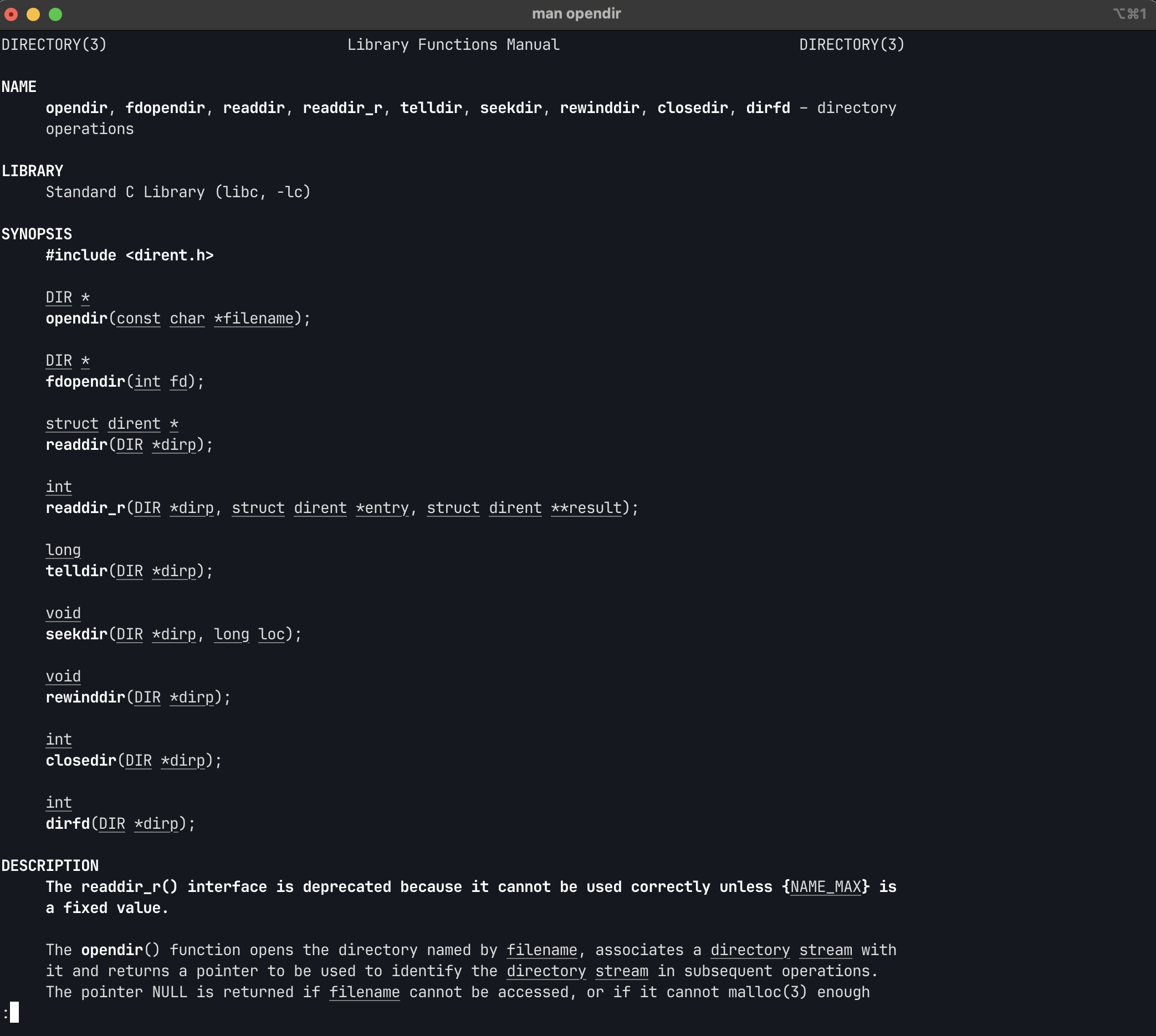 The man page for opendir
Understanding opendir()
The opendir function takes a directory name as a string argument and returns a pointer to a DIR — this is the directory stream. A directory stream, as far as I understand it, is an object that represents the directory we just opened. We get a pointer to the directory stream, and then we can use it to read the things inside the stream.
Code and Debugging
Now let's play around a bit with our C code and the debugger GDB (GNU Debugger). GDB is a command-line debugger built by the GNU Project — you can use it to inspect programs written in many languages, including C, C++, and Rust, at runtime. Viewing variable values, stopping the code with breakpoints, inspecting memory — you can do it all. When you're learning systems programming, GDB is your closest friend.
Let's see what's going on inside:
//myls.c

#include <dirent.h>
#include <stdio.h>

int main(int argc, char **argv) {
  // DIR এর একটা pointer define করি
  DIR *dir_stream;

  // current directory (".") open করি
  dir_stream = opendir(".");

  // opendir error হলে NULL return করে, তাই error handle করি...
  if (dir_stream == NULL) {
    perror("Error while trying to open directory \n");
    return 1;
  }

  return 0;
}
The code above doesn't do anything useful yet, but I'll use it to peek inside DIR with gdb (sorry, I can't hold back the curiosity!). First, I'll compile with the -g flag in gcc:
gcc -Wall -Werror -g myls.c -o myls
Once the executable is ready, let's fire up gdb and see what's going on inside:
gdb ./myls
GDB Commands
These are the basic gdb commands I used to look inside:
-
tui layout src— gives you a nice split-screen, source code on top and gdb commands below. -
set print pretty on— shows the printed output in a nice readable format. -
b 9orbreak 9— sets a breakpoint at line 9 (DIR *dir_stream). -
run— starts the program withgdb. -
p *dir_streamorprint *dir_stream— shows the content inside thedir_streampointer. -
nornext— executes the next line of code.
Inside the DIR Structure
When you peek inside dir_stream, you see something like this:
$1 = {
  fd = 3,
  lock = 0,
  allocation = 32768,
  size = 0,
  offset = 0,
  filepos = 0,
  errcode = 0,
  data = 0x5555555592d0 ""
}
Let's understand what's here:
-
fd = 3: This is our file descriptor number. A file descriptor is an integer that identifies an open file within a program. The numbers 0, 1, and 2 are usually reserved for standard input, output, and error, so 3 is the next available number.
-
allocation = 32768: This says 32KB of memory was allocated.
-
size = 0: The file's current size is 0 bytes.
-
offset = 0: This shows the position for the next read/write is at the start of the file.
-
data = 0x5555555592d0: This is the memory address where the directory stream's data is stored.
What the Code Does, Step by Step
Let's look at the earlier code again, this time breaking it down a bit:
1. Header includes:
#include <dirent.h>
#include <stdio.h>
dirent.h — directory-related functions (opendir, readdir, closedir). stdio.h — input/output functions (printf, perror).
2. Declare the DIR pointer:
DIR *dir_stream;
DIR is an opaque type — meaning we're not supposed to know what's inside it (but we just saw it with GDB!). We use a pointer because opendir() returns a pointer.
3. Open the directory:
dir_stream = opendir(".");
"." means the current directory. This is a Unix convention — . = where we are, .. = one level up.
4. Error handling:
if (dir_stream == NULL) {
    perror("Error while trying to open directory");
    return 1;
}
If opendir() fails, it returns NULL. perror() doesn't just print a message — it also tells you the actual reason from errno (like "Permission denied" or "No such file or directory").
File Descriptors in Detail
We saw fd = 3 in the DIR structure. Let's understand this a bit more, because the file descriptor is a really important concept in systems programming:
In Unix, everything is a file — regular files, directories, sockets, pipes, devices — they all have a file descriptor (fd). It's an integer the OS hands you:
fd 0 → stdin  (keyboard input)
fd 1 → stdout (screen output)
fd 2 → stderr (error output)
fd 3 → আমাদের directory (opendir দিয়ে পেলাম)
fd 4 → পরবর্তী কিছু open করলে...
When each process starts, 0, 1, and 2 are already reserved. So our directory's fd = 3 — the next available number.
What I Learned Today
| Topic | What I learned |
|---|---|
opendir() | Opens a directory and returns a DIR* pointer |
DIR structure | Holds fd, allocation, offset etc. inside — you can see it with GDB |
| File Descriptor | An integer the OS hands out — one for each open resource |
perror() | Prints an error message + the reason from errno |
| GDB | Lets you inspect any variable/struct at runtime |
| Unix convention | . = current dir, .. = parent dir, everything is a file |
Conclusion
I don't know about you, but for me — now that I can see what's going on inside, it doesn't feel as scary as it did at the start — well, still a little scary, but less than before.
In Part 2 we'll read from this directory and print its content.
Hasta la vista!
The Full Series
| Part | Topic |
|---|---|
| Part 1 (this post) | opendir(), the DIR structure, debugging with GDB, file descriptors |
| Part 2 | readdir(), the dirent struct, closedir(), the complete ls |